Wireless CarPlay receiver
An experimental wireless CarPlay receiver that brings a real iPhone’s interface to a native macOS window over Bluetooth and Wi-Fi.
- Type
- Automotive software
- Date
- Built with
- C++20, Bluetooth, AirPlay, VideoToolbox, CMake
What it is
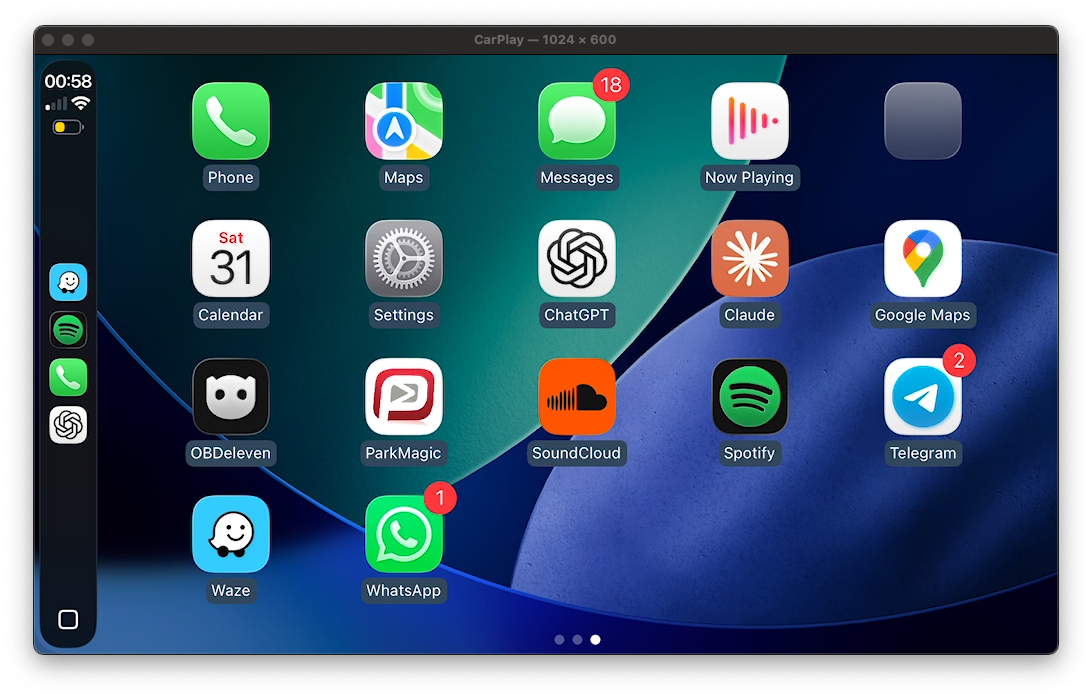
A wireless CarPlay receiver written in C++20. The Mac acts as the head unit: Bluetooth handles the initial connection and accessory negotiation, then Wi-Fi carries the encrypted video stream into a native macOS window.
The image above is an actual live session captured on 31 October 2026.
What works
- Native macOS Bluetooth pairing and a full-duplex RFCOMM connection.
- iAP2 synchronization, MFi authentication and accessory identification.
- Wi-Fi handoff to a Mac-hosted hotspot.
- AirPlay pairing, encrypted control and H.264 video decryption, decoding and display.
Fixing the picture
A video framing bug could mistake certain NAL lengths for start codes, producing blocky corruption. The receiver now parses codec-specified lengths explicitly, preserves decoder state across duplicate configuration and rejects stale presentation callbacks. The output looked cleaner after a live restart.
Preparing for other systems
The protocol engine is separated from video, audio and input backends. The macOS adapter uses VideoToolbox and AppKit; headless and custom-backend builds provide a starting point for porting. Native Raspberry Pi/Linux and QNX/NBT hardware adapters are still to be built and tested.
Connect — BMW NBT
The intended connection experience for this receiver running on a BMW NBT head unit. The receiver must already be installed and configured. This workflow is being developed for the NBT port; the live connection shown above is currently verified on macOS.
First connection
- Park the car and open the CarPlay receiver on the head-unit display. Leave its connection screen open.
- On your iPhone, turn on Wi-Fi and Bluetooth, unlock it, and open Settings → Bluetooth.
- Select the receiver name shown on the head-unit connection screen. Compare the pairing codes on both displays, then accept Pair when they match.
- Accept Use CarPlay on the iPhone. Allow CarPlay while locked if you want it to reconnect without unlocking the phone each time.
- Keep Wi-Fi enabled while the receiver hands the session over to its hotspot. Bluetooth pairing starts the connection; Wi-Fi carries the CarPlay session. If asked to join a network, use the receiver's displayed network details.
- Once the CarPlay home screen appears, choose Maps, Phone or your music app. The NBT port will need its iDrive controls and audio output connected to the receiver before those features can be used in the car.
Coming back to the car
Open the receiver with the previously paired iPhone nearby and Wi-Fi and Bluetooth enabled. The saved pairing and CarPlay approval are intended to be reused, so another approval prompt may not appear. Automatic startup and reconnect recovery on NBT still need implementation and testing.
If it does not connect
- Paired, but no CarPlay prompt: Bluetooth pairing alone is not the full connection. Keep the receiver running and the iPhone unlocked on its Bluetooth settings screen. Check Settings → General → CarPlay for an existing receiver entry; an approved connection may not ask again.
- Pairing unsuccessful: stop the connection attempt, toggle iPhone Bluetooth in Settings and retry once. The receiver's pairing and service-discovery logs distinguish a missing bond from a data-channel failure.
- Waiting for the CarPlay screen: keep Wi-Fi enabled and check that the receiver's hotspot is available. A Bluetooth connection by itself cannot carry the display.
- Music stays on the iPhone: audio routing is still under investigation in this project. Working video does not yet establish working head-unit sound.
Still in progress
Mouse-to-touch interaction and richer iAP2 status updates are implemented. A repeatable Mac connection launcher now preserves the setup and AirPlay identity between runs. Audio playback is implemented but remains unverified through the receiver. Microphone/Siri input, physical iDrive and media controls, automatic hotspot setup and reconnect recovery remain open. True wired CarPlay is a separate piece of work.
This is an experimental project. Compatible MFi credentials are required and are not distributed with it.
Want to talk about this project, or something like it for your team?
Email me about it